Visit Japan Web: Complete Registration Guide for 2025–2026
Visit Japan Web: Complete Registration Guide for 2025–2026
Registering on Visit Japan Web (VJW) before your trip to Japan is one of the simplest ways to save time at the airport. This free government service lets you pre-fill your immigration card and customs declaration online — so you can breeze through arrival with a single QR code instead of standing in long paper-form queues. This guide walks you through every step, fully updated for 2025–2026.
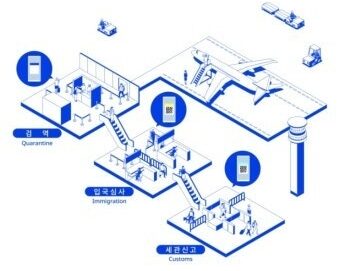
What Is Visit Japan Web?
Visit Japan Web is the official pre-arrival registration portal operated by Japan’s Digital Agency. It replaces the paper immigration arrival card and customs declaration form that used to be handed out on the plane.
What it covers (2025–2026)
- Immigration clearance + Customs declaration — combined into one unified QR code (since January 2024)
- Tax-Free shopping QR — a separate optional code (being phased out from November 2026; see FAQ)
- Free to use — never pay a third-party site to register for you
- Not mandatory — paper forms are still accepted, but VJW is significantly faster
⚠️ Visit Japan Web Key changes in 2025–2026
- COVID quarantine declaration removed — no health declaration section anymore
- Joint Kiosks launched at Haneda, Narita & Kansai airports — scan once for both immigration and customs
- Fukuoka Airport: still using the traditional two-step process (immigration counter + separate customs scan)
- Tax-free system changing from November 1, 2026 — most stores have stopped scanning VJW tax-free QR codes; keep receipts and claim a refund at the airport on departure
What You Need Before You Start
- Passport (name, date of birth, passport number, nationality)
- Email address for account verification — use one you actively check
- Flight details: flight number of the plane landing in Japan, departure city, arrival date
- First accommodation details: hotel name, address, postal code, and phone number in Japan
- Passports for all traveling companions (including children)
💡 Tip: If you don’t have your hotel details memorized, a quick Google search for the hotel name will show the Japanese address and phone number. For the postal code, enter numbers only — drop the hyphen (e.g., enter 8120016, not 812-0016).
Visit Japan Web Step-by-Step Registration
| STEP 1 | Create Your Account • Go to vjw.digital.go.jp → select ‘Create new account’ • Enter your email address and set a password • A verification code will be sent to your email — enter it to confirm • Multi-factor authentication (MFA) is optional — you can skip it |
| STEP 2 | Register Travelers (Yourself + Companions) • Under ‘Your details’, enter your personal information exactly as it appears on your passport • Fill in: full name (romanized), date of birth, nationality, passport number • Select ‘No’ when asked about Japanese passport or re-entry permit (for tourists) • Add family members or travel companions under ‘Family members’ → Up to 10 people can be added to one account → Children must also be individually registered |
| STEP 3 | Enter Flight & Accommodation Details • Select ‘Register planned entry/return’ • Enter: flight number (of the flight landing in Japan), departure city, and arrival date → Only the inbound flight number is required — no need to enter your return flight • Enter first accommodation: hotel name, Japanese address, postal code, and phone number → If unsure, search for the hotel on Google to find the Japanese address |
| STEP 4 | Complete Immigration & Customs Declaration • Click ‘Immigration clearance and Customs declaration’ • Fill in: purpose of visit (Tourism), length of stay, accommodation details • Customs section: answer questions about items you’re bringing into Japan → Most tourists answer ‘No’ to all questions • ⚠️ You MUST complete the customs section — without it, your QR code will not be valid → Skipping customs is the #1 most common mistake with Visit Japan Web • For families: immigration QR is individual; customs can be filed by one person for the group |
| STEP 5 | Get Your QR Code & Save It • After completing all sections, tap ‘Display QR Code’ • Each traveler receives their own individual QR code • How to save your QR code (important!): → Safest option: Install the official Visit Japan Web app (iOS/Android) → access QR offline → Alternative: Screenshot the QR code — works at most airport scanners in practice → Last resort: Log in at the airport using free Wi-Fi • Complete registration at least 6 hours before landing • Once you display the QR code, you can no longer edit that trip’s information |
Using Your QR Code at the Airport
Fukuoka Airport — Two-Step Process
- Step 1 — Immigration counter: Show QR code + present passport + fingerprint scan + photo taken (children under 6 exempt from biometrics)
- Step 2 — After collecting baggage, proceed to Customs: Show the same QR code again (one per family is sufficient for customs)
Haneda / Narita / Kansai Airport — Joint Kiosk
- Scan QR code + passport once at the Joint Self-Service Kiosk → handles both immigration and customs simultaneously
- If you have nothing to declare, proceed through the electronic gate using facial recognition
⚠️ Having a QR code does not guarantee skipping a manual inspection. Customs officers may still direct you to a baggage check regardless.
Frequently Asked Questions
Q: Is Visit Japan Web registration mandatory?
No. As of 2026, registration is entirely optional for all nationalities. Paper forms are still distributed on the plane and accepted at all Japanese airports. However, VJW users move through immigration significantly faster — especially on busy arrival days — and it takes less than 20 minutes to register, so it’s strongly recommended.
Q: Can I use a screenshot of my QR code?
Official guidance recommends displaying the QR code live via the website or app. In practice, screenshots work at virtually all airport scanners in Japan as of early 2026, provided the colored header of the QR code is visible in the screenshot. The safest approach is to install the official VJW app, which stores your QR code for offline access — no airport Wi-Fi needed.
Q: Do children need their own registration?
Yes — each traveler needs their own immigration QR code, including children. For customs, if your family is declaring together, only one person (typically the first registrant) needs to complete the customs section — other family members are grouped automatically.
Q: What if my flight changes after I register?
You can edit trip information any time before you display the QR code. Once the QR code has been displayed (activated), that trip is locked. If your flight changes significantly, create a new trip entry with the updated details rather than editing the existing one, as edits sometimes don’t propagate correctly.
Q: Should I bother registering the Tax-Free QR?
From November 1, 2026, Japan is switching from in-store instant tax exemption to an airport refund system. Most major retailers (convenience stores, drugstores, electronics shops) have already stopped scanning the VJW tax-free QR in 2026. If you plan to shop, keep all your receipts throughout the trip and claim your refund at the customs counter at the airport before departure.
Q: Do I need a separate app to use Visit Japan Web?
No — the service works through any smartphone browser at vjw.digital.go.jp, with no app download required. However, installing the official Visit Japan Web app is recommended so you can access your QR code offline at the airport without relying on Wi-Fi.
You Might Also Like
Fukuoka Transportation Pass Guide: Subway Pass vs Tourist City Pass (2026)